Package managers
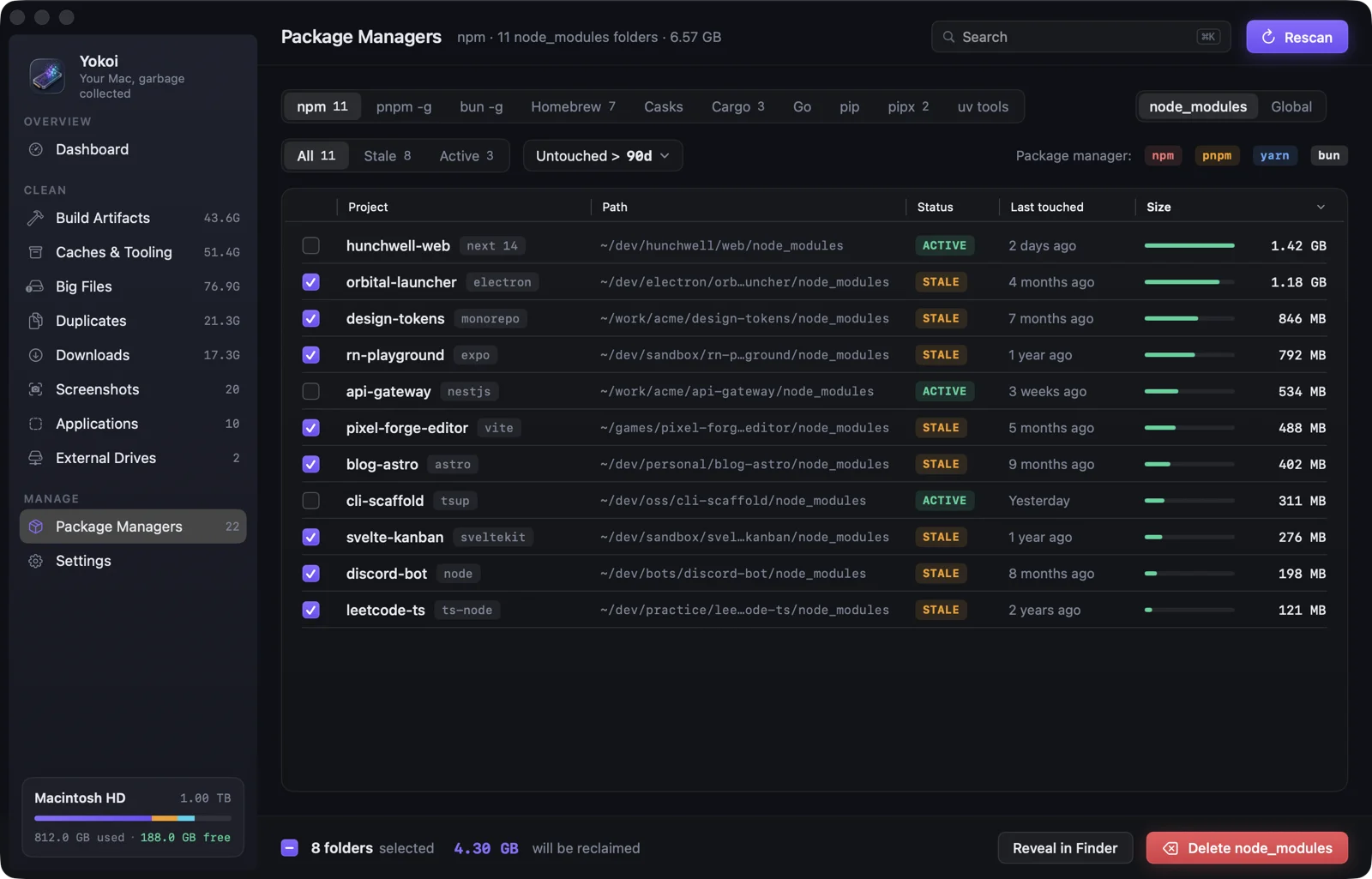
Every project node_modules for npm, pnpm, Yarn and Bun, plus global packages for 17 managers with outdated and unused flags.
Stale after 90 days untouched. Every update or uninstall shows the exact command first.
A native macOS cleaner built for developers. Yokoi finds the gigabytes your toolchains leave behind and removes them safely: Trash-first, logged and undo-able.
brew install --cask indieocean/tap/yokoi
What it cleans
Generic cleaners don't understand target/ or DerivedData. rm -rf does, but it doesn't forgive mistakes. Yokoi shows you what it found and why, then cleans it with a safety net.
Every project node_modules for npm, pnpm, Yarn and Bun, plus global packages for 17 managers with outdated and unused flags.
Stale after 90 days untouched. Every update or uninstall shows the exact command first.
Rust, Xcode, Swift PM, CocoaPods, Gradle, Python, .NET, Unity, Unreal, Go, Next.js, Angular and CMake output.
Only matched next to the project's marker file, so a random target/ is never touched.
JavaScript, Python (pip, uv, Poetry), Homebrew, Cargo, Go, Gradle, Maven, NuGet, Flutter, Xcode and simulators, Android emulators, VS Code, Cursor and JetBrains, Docker Desktop and OrbStack, browsers, and AI models.
Every location is tagged Safe Re-download or Review. Sizes count only what cleaning frees.
Caches and logs from Claude, Codex, ChatGPT, Grok, Copilot CLI and OpenCode. Session history for Claude Code, Grok, Gemini CLI and Copilot CLI, old Grok versions and the Claude Cowork VM.
History is tagged Review, so it's never auto-cleaned. Logins, settings and Claude project memory are never touched, and each agent's files wait until it quits.
Unavailable iOS simulators, local Time Machine snapshots, unused Docker images, build cache and dangling volumes, and the Go module cache.
Done through the tool itself (xcrun simctl, tmutil, docker, go), with the command shown first.
Videos, archives, disk images, VMs, 3D and art files, found with a log-scale slider from 100 MB to 10 GB+.
Filter by type, then reveal in Finder or clean.
Files with identical contents across your big-file locations, or in one folder you choose.
One copy always stays. Copies that are all inside git repos aren't listed unless you choose that folder.
Installers, archives, media and folders, with when each was added and last opened.
Leftover installers and already-extracted archives are flagged. Your own files are never preselected.
Screenshots and screen recordings in your screenshot folder.
File them by month or trash them, by hand or with a daily rule.
Installed apps with size, last opened, and their leftovers in ~/Library.
Uninstalls the app and its support files. Apple apps and running apps are locked.
The drive's own Trash, .DS_Store files and ._ AppleDouble files on exFAT, FAT and NTFS.
Time Machine disks are locked.
A quick tour
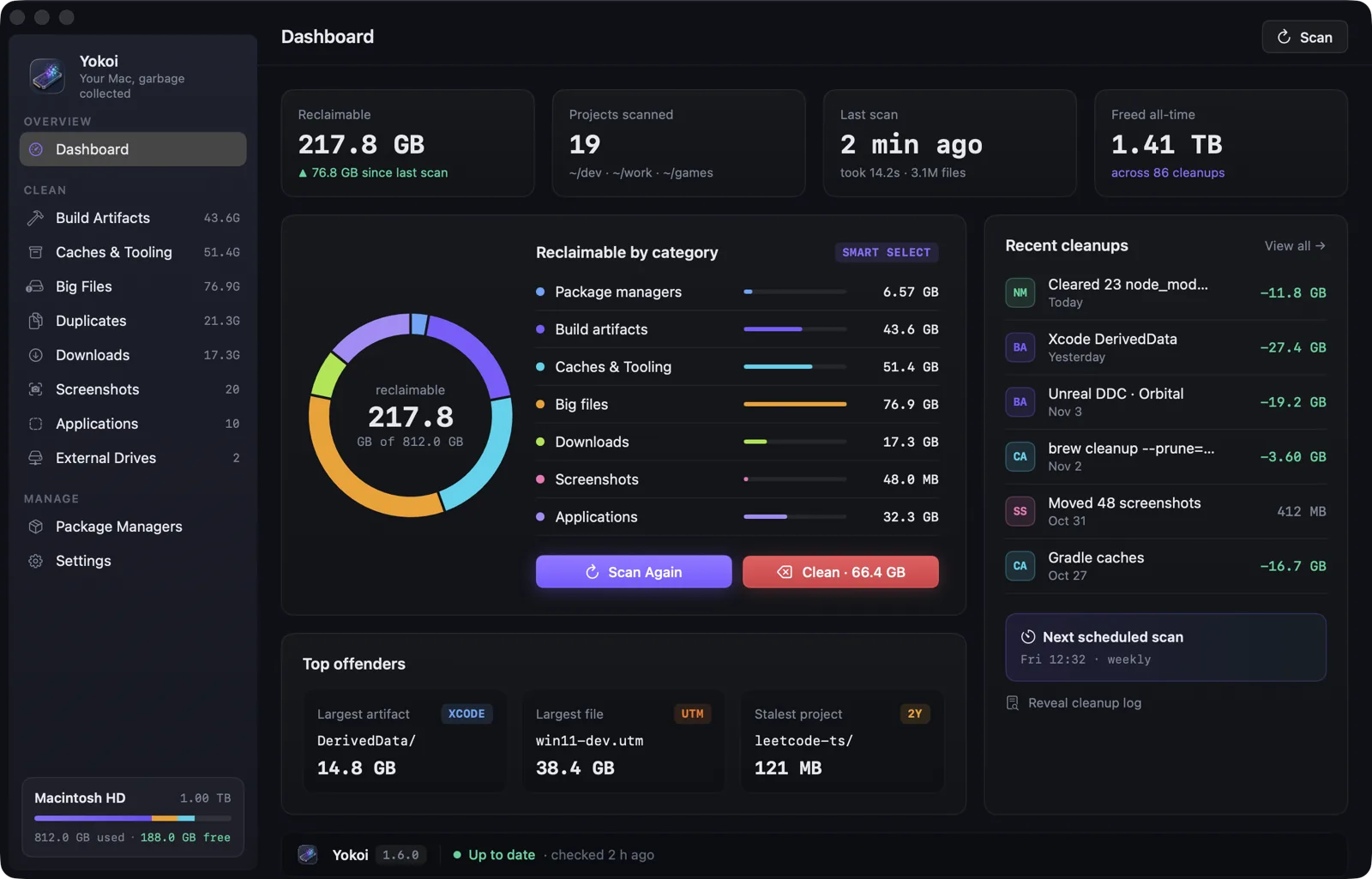
Dark-first, translucent sidebar, monospace for every path and size. Everything you'd expect from a native Mac app.
Safe by design
Everything goes to the Trash by default and can be put back from the dashboard. Permanent delete is always an explicit choice, and never the default.
Preview exactly what would happen, with sizes, without touching a byte.
Each category can only touch its own folders. Keychains, Mail, Messages, iCloud Drive, Photos, /System and .git are blocked unconditionally.
Projects open in Xcode, Unity, Unreal or a running node process, and the files of AI agents that are running, are refused, checked when you confirm and again right before acting. Recently touched projects start unchecked.
The duplicate finder won't let you pick every copy of a file. Right before removing a copy, Yokoi reads it and a copy being kept again, and refuses if they no longer match.
Never runs sudo. Tools run without a shell, from a full path you see before confirming, and only from folders you or an administrator control. Symlinks are removed, never followed, and paths are re-checked at their real location.
Every cleanup goes to cleanup.log with path, size, action and where it went.
Everyday use
# the app binary doubles as a CLI $ yokoi scan $ yokoi scan --json | jq .reclaimableBytes 218103808000 $ yokoi scan --category caches,build-artifacts --top 10 # shows what it would do until you add --yes $ yokoi clean $ yokoi clean --yes --permanent
Yokoi only uses the network when you click Check for Updates on the Packages screen, and for a small signed update feed from GitHub. That request carries Yokoi's version and nothing else.
FAQ
Yes. Your package manager or toolchain rebuilds them (npm install, cargo build, reopening the project in Unity…). Yokoi shows the restore command before you confirm, and only matches build folders next to their project files.
Not unless you pick it. Agent caches and logs are tagged Safe, but session history is tagged Review, so it's never preselected and auto-clean and yokoi clean leave it alone. Yokoi never touches agent logins, settings, skills, plugins or Claude project memory. Codex sessions and Cursor chats aren't offered at all, because each agent tracks them in its own database and removing the files alone could leave it out of step.
Anything moved to the Trash can be put back from Recent cleanups on the dashboard, until you empty the Trash. Permanent deletes can't be undone, which is why they always need an extra confirmation.
macOS protects some caches and folders. Without access, Yokoi can't measure them and skips them. Full Disk Access is optional: everything else works without it. Even with access, Yokoi never touches Keychains, Mail, Messages, iCloud Drive or Photos.
It's a broad grant, and the tools Yokoi runs for you (brew, npm, docker…) inherit it. That's why each tool is run from a full path you see before confirming, and only from a folder that you or an administrator control.
That check keeps out other accounts on the Mac, not programs already running as you. Yokoi finds tools the way your shell does, so folders you own like ~/.cargo/bin or ~/.nvm are searched too. Malware already running under your account could put a fake npm there, and Yokoi would run it with Full Disk Access. The full path in the confirmation is how you'd spot it. If you don't want any tool to inherit the grant, leave Full Disk Access off: Yokoi still scans and cleans everything it can read.
The App Sandbox only lets an app into folders you pick in an Open panel, and it can't run other programs. A cleaner that measures ~/Library/Caches, node_modules across your projects and Xcode's folders, and runs brew, npm or docker to clean up after them, can't work inside it. Yokoi is notarized and built with the Hardened Runtime and no exception entitlements: no unsigned code, no injected libraries, no debugger attach.
No. Yokoi never uses sudo. A few actions macOS reserves for administrators, like removing root-owned files, are shown as commands you can run yourself.
Through Sparkle. Every update is signed, and Sparkle refuses one whose signature doesn't match. You choose whether it checks automatically.
It's the same idea as in a runtime: find what's no longer reachable from your active work, such as stale dependencies, rebuildable output and caches nobody reads, and reclaim it without touching anything still in use.
Free and open source. macOS 14 Sonoma or later.
brew install --cask indieocean/tap/yokoi